Thanks, WordPress. It’s Not You, It’s Just AI
On this page
If you run a website, sooner or later you ask the same question: do I keep using WordPress, or do I build something of my own? I have answered it more than once. I wrote my own CMS in 2005, moved to WordPress in 2009, tried headless setups and other CMS platforms, and now run a site built with AI that has no WordPress and no framework.
This post is a plain comparison of the two ends of that road, a DIY CMS and WordPress, plus what I would tell you before you pick. The short version: WordPress has had its time, and I think we should start considering AI as the CMS. So, thank you, WordPress. It’s not you. It’s just AI.
Why Consider Leaving WordPress at All
I find everything broken, and I am always looking for ways to fix things with technology. WordPress did a lot right for me, so leaving was not a rage quit. It was a slow build-up of small things:
- Plugins and themes put basic features behind paywalls. Simple things like forms and email had pay-per-feature pricing, and so did themes.
- Everything wanted to add its branding and links back to its own site.
- The site got slow. My first page load took over 1.5 seconds and it felt slow. Speed and UI have always been top of mind when I build sites, so I was never thrilled with it.
- I was losing control. I became more and more dependent on themes and plugins, and my site started adopting their standards instead of doing what I wanted.
- It was a single point of failure. A plugin, WordPress, theme or PHP upgrade could take the site down, because everything depended on everything else.
If none of that sounds familiar, WordPress may be fine for you. If it does, keep reading.
Option 1: Build Your Own CMS
I have always kept a personal website, going back to 2002. I built it with PHP and MySQL, the popular stack on shared hosting. At first I stitched pages together by hand with PHP includes and edited the files to add content.
In 2005 I built my own backend, since my background is in app development. I was a traveling consultant and I wanted to document the random restaurants I went to, so I needed an easy way to add posts. It was simple: I filled in fields, and every field had a specific function. I never built out picture handling, which is a big part of why WordPress came in handy later.
What a DIY CMS gives you: total control, and only the features you actually build. What it costs you: everything you do not build. For me that was pictures, a proper editor and a nicer way to change the design.
Option 2: WordPress
In 2008 I learned about WordPress and started building sites in it for other people. In 2009 my own site moved over. The driving force was how easily I could update the design and the editor WordPress already had in place.
What WordPress gives you: a ready-made editor, themes, and a plugin for almost anything. What it cost me over the years: the list at the top of this post. WordPress started as a way to make web development quick and simple. Over time it turned insanely complex, and even the admin became bloated. Writing a post got complicated, and I was not always sure where I had to go to change a piece of content.
Option 3: The Middle Roads
Before I left WordPress, I tried to fix it the developer way.
- Headless WordPress. I built a few sites with WordPress in the back and a 100% custom front end. The catch: every major WordPress update would eventually break something, and I spent a lot of time working out which API had changed and why. I went back to full WordPress and even paid for some great themes.
- Drupal and Directus. I explored both. Directus was great, until version 9 moved it from PHP to NodeJS.
- Ghost. I noticed other people using it, but it lacked the flexibility I wanted.
My Personal Experience: DIY Again, This Time With AI
It started small. I used AI to format my content so I could paste it into WordPress. Then I used AI to build custom plugins. I started a theme and asked myself: what is the point? Why not have AI build a simpler, more static site? I had already had AI build some complex applications for my home automation projects, so I decided to have it build my site exactly the way I wanted.
The result is a small PHP footprint with the features I wanted, doing what I need it to, on my terms. I built and tested it on a build server at home and staged it before the cutover, with a rollback plan. The whole build, through the cutover, took about 6 hours of effort on my side.
The hard part was URLs, not code. I did not want to lose the few SEO wins I had or end up with broken links. I switched WordPress’s “Category” to “Topics” and redirected the many feeds WordPress creates. We built a layer that holds all the old URLs and maps them to the new ones. I can retire that layer over time, and it lets me use the right status codes: 301 for pages that moved and 410 for pages that are gone, such as my retired restaurant reviews.
Where Claude steered me wrong: its first instinct was to go down the Astro route. I felt that overcomplicated things with no value, so I pushed back and we built it with no framework at all.
The Numbers
On desktop, PageSpeed First Contentful Paint went from 1.5s to 0.2s. On mobile it went from 2.5s to 0.9s, so there is still work to do there. We know images are the cause.
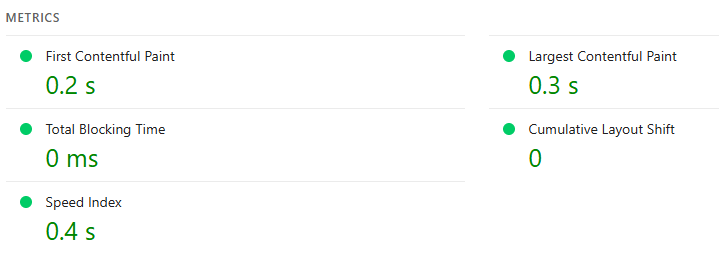 Desktop results for the new site.
Side by Side
| WordPress | Now | |
|---|---|---|
| Writing | Ready-made editor, but it got more complex over time | Markdown, drafted through a local admin |
| Pictures | Built in, which is why I switched | Uploads with WebP thumbnails |
| Control | Themes and plugins set the standards | I decide, and I own every decision |
| Cost | Forms, email and theme features behind paid tiers | My time |
| Speed | Desktop First Contentful Paint 1.5s, mobile 2.5s | Desktop First Contentful Paint 0.2s, mobile 0.9s |
| Extras | Themes, plugins and PHP upgrades that depend on each other | No framework, no jQuery, no third-party dependencies |
| Security | Admin portal on the internet | Admin runs locally and is my staging server. Only what needs to be public is on eattechdad.com |
| Mobile | At the mercy of your theme | Two different looks and feels if I want them |
The CSS is the same story: it has only what the site needs, not the extra stuff in a theme that I may or may not use.
What I’d Tell You Before You Try It
Start with an inventory. I built the new site and moved off WordPress in about 6 hours of my own effort, but I really understood what I had set up in WordPress. If you do not know what is going on inside your site, expect it to take longer. My suggestion for step one is to have an AI tool inventory your site. You could have Claude Desktop crawl your admin panel and site, or give it MCP access to WordPress. SSH access is even better.
Be honest about your background. My web development background helped me steer Claude toward what I wanted. If you have no development background, going fully DIY might not be the easiest approach, and a tool like Astro is the kind of thing I would suggest. It was not for me because I wanted no framework dependencies and a 100% DIY build.
- Keep it simple.
- Test every change.
- Ask the most important question: “Is there a better or easier way to do this?”
- Do not let AI just build for you. Control the build. Make it ask you before it builds, and make it design before it builds.
- Design it your way. That is the beauty of DIY. A local-only admin works for me, but it may not work for everyone, especially if you have multiple authors.
Final Thoughts
I love web and app development, but I constantly found my time going to managing the tools and not to the content. The focus was supposed to be the content. A DIY CMS used to mean giving up the editor and the pictures. With AI doing the typing and me making the decisions, that trade looks very different.
This post is part of the story. It was drafted through a local admin I built so Claude can write drafts for me. It saves drafts only, I publish myself, and it never deploys anything.
What I gave up: the ability to edit my site remotely. I now need to be on my home network to use the admin. That was by design, because I wanted the security.
What I gained: speed, control, a smaller attack surface, and my focus back on the content.
Thank You, WordPress
Before I say goodbye, I want to truly thank the team behind WordPress. Matt Mullenweg and Mike Little built it, starting back in 2003, and it has stayed free and open source ever since! As a PHP developer, I often wonder if PHP would be around today without WordPress.
I believe WordPress built the standard for how sites work. Categories, tags and tag clouds are things we all take for granted now, and I think they became standards because of that team’s vision. Even my new site has Topics and tags, because that is how people expect a site to work.
Thank you, Matt, Mike and everyone who has worked on WordPress. You made building for the web easier for a lot of us, including me.
WordPress is a trademark of the WordPress Foundation. This site is not affiliated with or endorsed by WordPress or the WordPress Foundation.
Looking for more? Check out my other tech articles.